
Overview
Divi Theme WordPress: Complete Features, Benefits and Review
Choosing the right WordPress theme is an important step when building a professional website. Your theme affects how your website looks, how visitors interact with your content, and how easily you can customize different sections without depending entirely on developers.
The Divi Theme WordPress solution is a popular option for people who want greater design flexibility and visual control over their websites. Developed by Elegant Themes, Divi combines a WordPress theme with a visual page-building experience that allows users to create and customize website layouts directly from the front end.
Whether you are creating a business website, personal blog, portfolio, agency website, landing page, or online store, Divi provides a collection of design tools that can help you build different types of websites.
But is the Divi WordPress Theme the right choice for your project? What features does it provide? How does its visual builder work? Are there any disadvantages you should consider before purchasing it?
In this comprehensive guide, we will explore the main features, customization options, benefits, limitations, pricing considerations, and practical use cases to help you make an informed decision.
What Is the Divi WordPress Theme?
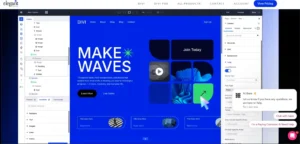
Divi is a premium WordPress theme and visual website-building platform developed by Elegant Themes. It combines theme customization capabilities with a drag-and-drop visual builder, allowing users to design website pages without manually writing HTML, CSS, or PHP for every layout.
Unlike a basic WordPress theme that mainly controls the website’s appearance, Divi provides a more extensive design environment. Users can customize page layouts, create reusable design elements, adjust typography, manage colors, and build different website sections using visual controls.
One of its main attractions is the ability to edit website content directly on the front end. Instead of repeatedly switching between an editor and a preview page, users can see their design changes while working.
Divi is designed for different experience levels, including beginners, experienced WordPress users, freelance designers, and website development agencies.
How Does the Divi Visual Builder Work?

The Divi Visual Builder provides a front-end editing environment where users can create and customize website layouts through a visual interface.
After activating Divi on a WordPress website, users can open a page and enable the Visual Builder. They can then select an existing layout, start with a blank design, or use available AI-assisted building options where supported by their membership.
The builder uses a structured layout system consisting of sections, rows, columns, and modules.
1. Sections
Sections are the main containers used to organize different parts of a webpage. For example, a homepage may contain a hero section, services section, company introduction, testimonials, and contact section.
2. Rows
Rows organize content inside sections. They allow users to create different column arrangements for placing text, images, buttons, and other design elements.
3. Columns
Columns divide rows into smaller content areas. You can use multiple column structures depending on the layout you want to create.
4. Modules
Modules are the individual content and design elements placed inside columns. Depending on the available modules and version, these can include text, images, buttons, galleries, forms, pricing tables, and other website components.
This structure gives users control over how different website elements are arranged and displayed.

Key Features of the Divi WordPress Theme
Divi includes several design and website-building capabilities. Understanding these features can help you determine whether the platform matches your website requirements.
1. Drag-and-Drop Visual Page Builder
One of the most important features of the Divi WordPress Theme is its visual drag-and-drop builder.
Users can add modules, move content blocks, change spacing, adjust layouts, and modify design settings through a visual interface.
This approach can reduce the need to write custom code for common website design tasks.
For example, when creating a business homepage, you can visually add a headline, introductory paragraph, call-to-action button, and background image without manually building the entire HTML structure.
Practical benefit: Beginners can experiment with page layouts while experienced designers can use the available controls to create more customized designs.
2. Divi Theme Builder
The Divi Theme Builder extends customization beyond individual pages.
It allows users to create templates for different areas of a WordPress website, including:
- Website headers
- Website footers
- Blog post templates
- Category and archive pages
- Product page templates
- Search result pages
- Custom templates for different content types
- 404 error pages
This feature is particularly useful when you want consistent branding and layout structures throughout your website.
For example, you can create one blog post template with a consistent title area, featured image, author information, article content, and related content section. Instead of designing every post individually, you can apply the template to eligible posts.
3. Premade Website Layouts
Creating a website from a completely blank page can take considerable time, especially if you are new to web design.
Divi provides access to premade layouts and website design resources that can help users start their projects more quickly.
These layouts can be used as starting points for different website categories, such as:
- Business and corporate websites
- Creative agency websites
- Personal portfolios
- Photography websites
- Consulting websites
- Restaurants and hospitality websites
- Educational websites
- Online stores
You can customize the imported layout by changing text, images, colors, fonts, sections, and other design elements.
Important: A premade layout is a starting point, not a replacement for original website content, branding, and thoughtful design.
4. Responsive Website Design
Modern websites need to work properly across desktop computers, tablets, and smartphones.
Divi includes responsive design controls that allow users to customize how individual design elements appear on different screen sizes.
You can adjust settings such as:
- Font sizes
- Element spacing
- Section padding
- Column layouts
- Image dimensions
- Element visibility
- Responsive alignment
These controls are useful when creating mobile-friendly landing pages, business websites, and content-heavy layouts.
However, responsive controls do not automatically guarantee a perfect mobile experience. You should always test important pages on real devices or appropriate browser screen sizes.
5. Global Colors and Design Styles
Maintaining consistent colors and typography is important for professional website design.
Divi provides global design settings that help users manage recurring visual styles across their websites.
For example, you can establish a brand color palette containing your primary color, secondary color, background color, and accent color.
When supported global colors are used throughout a design, changing a global color can help update multiple elements without manually editing each one.
Global styles are particularly useful for websites with multiple pages that need to maintain the same visual identity.
6. Reusable Design Elements
Divi includes a design library that allows users to save and reuse layouts and design components.
This can be useful when building several pages with similar structures.
For example, a website designer may create a reusable call-to-action section and use it on multiple service pages.
Where global elements are used, changes can be synchronized across the locations where those elements appear.
This approach can improve consistency and reduce repetitive design work.
7. Custom CSS and Code Editing
Although Divi is designed to support visual website building, developers can also use custom code when additional control is required.
Depending on the editing area, users can work with:
- Custom CSS
- HTML code
- Custom code modules
- Element-specific design settings
- Additional integrations
This makes Divi useful for developers who want visual editing convenience while retaining the option to customize specific design details.
For advanced PHP functionality, WordPress hooks, custom plugins, and server-side features, developers will still need appropriate development knowledge.
8. Dynamic Content
Dynamic content allows website layouts to display information from WordPress content and other supported data sources.
For example, a dynamic blog template can display the current post title, featured image, author information, and publication content without requiring a separate manually designed template for every post.
This is useful for websites that publish articles regularly or manage many similar content pages.
9. Divi 5 and Its Newer Design Capabilities
Divi 5 represents a major development of the Divi building experience. Its documented feature set includes improvements to the design interface and additional tools for building more flexible layouts.
Some of the notable capabilities documented for Divi 5 include:
- Design Variables: Manage reusable design values across website elements.
- Grid Editor: Work with more flexible grid-based layouts.
- Nested Rows: Organize more complex layout structures.
- Interactions: Configure interactive behavior and visual effects.
- Customizable Breakpoints: Control responsive layouts at additional screen sizes.
- Loop Builder: Build repeatable layouts for dynamic content.
- Canvases: Manage off-canvas content such as menus and other interface elements.
- Style Inspector: Inspect and manage design settings more efficiently.
These capabilities can be valuable for designers and developers who need more control over complex WordPress layouts.
Before using a newer feature on an existing production website, check the official Divi documentation and migration guidance to confirm compatibility with your installation and extensions.
What Types of Websites Can You Build With Divi?
One reason people consider the Divi WordPress Theme is its flexibility across different website categories.
Business Websites
Businesses can use Divi to create company homepages, service pages, about pages, contact sections, and landing pages.
For example, a digital marketing agency can create separate pages for SEO services, website development, advertising, and consulting.
Personal Blogs
Bloggers can use Divi to customize article layouts, category pages, navigation menus, sidebars, and other website sections.
Its template-building capabilities can also help maintain a consistent article structure across a content-focused website.
Portfolio Websites
Photographers, designers, developers, and other creative professionals can use Divi to showcase their work through image galleries, project pages, and custom portfolio layouts.
Landing Pages
Divi can be used to create focused landing pages for services, digital products, newsletter subscriptions, and marketing campaigns.
Designers can organize page sections around a specific goal, such as requesting a consultation or submitting a contact form.
WooCommerce Online Stores
Divi can also be used with WooCommerce to customize supported shopping and product page layouts.
Depending on the configuration, users can create custom product templates and design different sections of an online store.
However, advanced ecommerce requirements may still require additional WooCommerce extensions, payment gateways, and custom development.
Advantages of Using the Divi WordPress Theme
Before selecting any premium WordPress theme, it is important to understand its practical advantages.
1. Extensive Design Flexibility
Divi provides many visual design settings that allow users to create different layouts without depending entirely on predefined theme designs.
2. Reduced Need for Custom Coding
Common page-building tasks can be completed using the visual editor. This can make website creation more accessible to people who do not have extensive coding experience.
3. Website-Wide Template Control
The Theme Builder allows users to manage headers, footers, blog templates, and other reusable website structures.
4. Reusable Design Resources
The ability to save layouts and reusable elements can help designers work more efficiently across multiple pages.
5. Responsive Customization
Device-specific design controls help users adjust layouts for different screen sizes rather than relying only on default responsive behavior.
6. Suitable for Different Project Types
Divi can support a variety of projects, from personal websites to business pages and ecommerce storefronts.
7. Developer Customization Options
Developers can extend visual designs using custom CSS and other supported code-editing options.
Disadvantages and Limitations of the Divi Theme
No website-building platform is perfect for every project. Although Divi offers extensive customization, there are some considerations worth understanding before purchasing it.
1. Learning Curve for Beginners
Divi offers many design controls and customization options. New users may need time to understand the builder, modules, global settings, and template system.
Starting with a simple layout and gradually exploring advanced options can make the learning process easier.
2. Website Performance Depends on Configuration
Visual page builders can introduce additional front-end resources depending on the design, modules, extensions, and settings being used.
A poorly configured Divi website with large images, unnecessary animations, excessive third-party scripts, or too many plugins may perform poorly.
To improve performance:
- Use optimized and appropriately sized images.
- Choose reliable WordPress hosting.
- Remove unnecessary plugins and modules.
- Use caching where appropriate.
- Minimize unnecessary animations and external scripts.
- Test important pages using real performance measurement tools.
3. Theme Switching Requires Planning
Divi combines theme functionality with a visual builder. If you later decide to move to another WordPress theme or page-building system, some layouts and design structures may require rebuilding or migration work.
Before switching, check which content is stored as standard WordPress content and which parts depend on Divi-specific builder structures.
4. Premium Subscription Costs
Divi is a commercial product. You should consider the membership cost, renewal conditions, available features, and support requirements before purchasing.
Some additional services are available through separate or bundled membership options, so compare the actual inclusions rather than assuming every service is included in the basic plan.
5. Third-Party Compatibility Must Be Tested
Websites often use multiple plugins for forms, ecommerce, SEO, security, analytics, and other functions.
Although Divi is designed to work within the WordPress ecosystem, you should test important plugins and custom integrations before deploying changes to a live website.
Divi Theme Pricing: What Should You Know?
Divi is available through Elegant Themes membership options. The available plans and bundled services can change, so it is important to review the official pricing page before making a purchase.
The main membership options include:
Divi Yearly Membership
The yearly option provides access to the Divi theme and builder for the subscription period, subject to the plan’s terms. It may be suitable for users who prefer an annual payment instead of a larger one-time payment.
Divi Lifetime Membership
The lifetime option is designed for customers who prefer a one-time payment for lifetime access to the included Divi products, subject to the membership terms.
Divi Pro Membership
Divi Pro combines Divi with additional services and tools, which may include Divi AI, Divi Cloud, Divi Teams, and Divi VIP.
These additional services may be useful for professional designers, agencies, and freelancers who manage multiple client websites.
Pricing advice: Do not make a purchase based only on an advertised discount. Review the current checkout price, billing frequency, renewal conditions, included services, website usage rights, and refund terms.
Official pricing and membership information:
Visit the official Elegant Themes pricing page.
How to Install and Activate the Divi WordPress Theme
After purchasing Divi from Elegant Themes, you can install it on your WordPress website.
Step 1: Purchase Divi
Visit the official Elegant Themes website and choose the membership that matches your requirements.
Step 2: Download the Theme
Sign in to your Elegant Themes account and download the Divi theme installation package.
Step 3: Open Your WordPress Dashboard
Log in to your WordPress administration panel and navigate to:
Appearance → Themes → Add New Theme → Upload Theme
Step 4: Upload the ZIP File
Select the downloaded Divi ZIP file and upload it through the WordPress theme installer.
Step 5: Install and Activate
Click Install Now. After installation is complete, select Activate to make Divi your active WordPress theme.
Step 6: Connect Your Elegant Themes Account
Follow the current account authentication and update instructions provided by Elegant Themes. This helps your website receive eligible product updates and access the services included with your membership.
Step 7: Create Your First Page
Navigate to Pages → Add New. Enter your page title and open the Divi Builder.
You can then select one of the available starting options:
- Build From Scratch
- Choose a Premade Layout
- Build with AI, where available
Customize your content and design, preview the result on different screen sizes, and save your page before publishing.
Is Divi Good for SEO?
Divi can be used to build websites that follow sound SEO practices, but installing a theme alone does not guarantee higher Google rankings.
Search visibility depends on several factors, including content quality, technical accessibility, page experience, website structure, relevance, and competition.
When using Divi, pay attention to the following SEO considerations.
1. Create Clear Content Structures
Use a logical heading hierarchy. Each page should have a clear main heading, descriptive section headings, and useful supporting content.
2. Optimize Images
Use descriptive image filenames, meaningful alternative text where appropriate, and properly sized image files.
3. Improve Page Loading Performance
Avoid unnecessarily large images, excessive animations, and scripts that do not contribute to the user experience.
4. Use a Clear URL Structure
Create short, descriptive URLs that help visitors understand the content of each page.
5. Write Helpful Content
Publish original information that answers visitors’ questions. Avoid creating pages solely to target repetitive keyword variations.
6. Use an Appropriate SEO Plugin
WordPress SEO plugins can help manage metadata, XML sitemaps, canonical settings, and other optimization tasks. Choose a suitable plugin and configure it correctly.
7. Check Mobile Usability
Review your website on smartphones and tablets. Make sure text is readable, buttons are accessible, menus work correctly, and important content is not hidden.
For more information, consult Google’s guidance on creating helpful, reliable, people-first content.
Divi Theme vs Divi Builder Plugin: What’s the Difference?
Divi is available as both a WordPress theme and a standalone builder plugin. Although both provide access to Divi’s visual building capabilities, they serve slightly different purposes.
| Comparison | Divi Theme | Divi Builder Plugin |
|---|---|---|
| Theme functionality | Included | Uses another active theme |
| Visual page building | Included | Included |
| Theme integration | Built into Divi | Works alongside a compatible theme |
| Website customization | Theme and page design | Page-building functionality |
| Best suited for | Users wanting the Divi theme experience | Users wanting Divi Builder with another theme |
If you want to use Divi as the foundation of your entire website, the Divi Theme may be the more straightforward option.
If you already use another WordPress theme and want to add Divi’s page-building functionality, the standalone plugin may be worth investigating.
Who Should Use the Divi WordPress Theme?
Divi can be a suitable option for several types of WordPress users.
Beginners
Beginners who want to build custom layouts without writing all the code manually may appreciate its visual interface. However, they should be prepared to spend time learning its controls.
Freelance Web Designers
Freelancers can use reusable layouts, design libraries, and templates to create different website designs for clients.
Digital Agencies
Agencies that build and maintain multiple websites may benefit from consistent design systems and reusable components.
Bloggers and Content Publishers
Bloggers can customize article templates, category layouts, navigation, and other website elements.
Small Business Owners
Small businesses can use Divi to create service pages, business information pages, lead-generation sections, and other website content.
Who Should Consider an Alternative?
Divi may not be the best option for every WordPress project.
You may want to evaluate alternatives if:
- You prefer a minimal theme with very limited customization controls.
- You want to avoid dependence on a particular visual builder.
- Your project requires a highly specialized custom front end.
- You prioritize a lightweight starting point over extensive visual editing features.
- You already have a well-established website using another page-building system.
The best choice depends on your technical requirements, workflow, budget, hosting environment, and long-term maintenance plans.
Tips for Building a Better Divi Website
Having access to many design features does not automatically make a website effective. The way you use those features matters.
Keep Your Design Consistent
Use a limited color palette, consistent typography, and reusable spacing rules. This helps create a professional appearance throughout the website.
Prioritize Navigation
Visitors should be able to find important pages without unnecessary clicks. Organize your main navigation around the information users actually need.
Avoid Unnecessary Animations
Animations can add visual interest, but excessive effects may distract visitors and affect the user experience.
Optimize for Mobile Visitors
Check your homepage, navigation, contact forms, product pages, and important landing pages on smaller screens.
Use Original Website Content
Customize premade layouts with your own images, descriptions, services, and business information. Avoid publishing generic template content without meaningful editing.
Maintain Regular Backups
Before making major design changes or updating important website components, maintain a recent backup of your WordPress files and database.
Keep Everything Updated
Use supported versions of WordPress, Divi, PHP, and your plugins. Test significant updates on a staging environment whenever possible.
Final Verdict: Is the Divi Theme WordPress Worth Considering?
The Divi Theme WordPress solution offers a flexible website-building environment for users who want extensive visual customization without manually coding every page.
Its visual builder, Theme Builder, premade layouts, responsive editing tools, global design settings, and reusable elements make it a versatile option for different types of websites.
It can be particularly useful for freelancers, agencies, bloggers, and business owners who want greater control over their website’s design.
However, it is important to consider the learning curve, subscription costs, website performance, and potential migration work before choosing it.
Divi is not automatically the best solution for every WordPress website. Your decision should depend on the kind of website you want to build and how much design flexibility you actually need.
If you value visual editing, reusable layouts, and website-wide customization, Divi deserves consideration. Review its official features, documentation, and membership terms before making your final decision.
Frequently Asked Questions About the Divi WordPress Theme
1. What is the Divi WordPress Theme?
Divi is a premium WordPress theme and visual website builder developed by Elegant Themes. It allows users to design and customize website pages using a visual editing interface.
2. Is Divi suitable for beginners?
Yes. Divi can be used by beginners because its visual builder reduces the need for manual coding. However, learning its different modules, settings, and design options may take some time.
3. Can I build a website without coding using Divi?
Yes. Many common website-building tasks can be completed through the visual builder without writing HTML, CSS, or PHP. Advanced custom functionality may still require coding or additional plugins.
4. Is Divi compatible with WooCommerce?
Divi can be used with WooCommerce to build and customize supported online store layouts. Additional extensions may be required for specific ecommerce features.
5. Does Divi support responsive design?
Yes. Divi provides responsive editing controls that let users adjust website elements for desktop, tablet, and mobile screens.
6. Can I customize the header and footer with Divi?
Yes. The Divi Theme Builder supports custom header and footer templates, allowing users to create website-wide layouts.
7. Is Divi good for SEO?
Divi can be used to build SEO-friendly websites. However, search performance also depends on content quality, technical SEO, website speed, internal linking, and other ranking-related considerations.
8. Does Divi offer premade website layouts?
Yes. Divi provides premade layouts that users can import and customize according to their website requirements.
9. Can I use Divi on multiple websites?
Elegant Themes advertises unlimited website usage for its Divi membership options. Check the current membership terms to confirm the usage rights and included services for your chosen plan.
10. What is the difference between Divi and Divi Pro?
Divi provides the core theme and builder experience. Divi Pro adds services such as Divi AI, Divi Cloud, Divi Teams, and Divi VIP, depending on the current membership offering.
11. Is Divi 5 different from Divi 4?
Yes. Divi 5 introduces a redesigned building experience and additional capabilities, including design variables, grid editing, interactions, and customizable breakpoints. Consult the official documentation for current release and migration information.
12. Where can I purchase the official Divi Theme?
You can purchase Divi directly from the official Elegant Themes website. Review the available plans, product inclusions, billing terms, and refund policy before purchasing.
Explore official Divi membership options.
Helpful Resources
- Official Divi Theme Website
- Elegant Themes Documentation
- Divi 5 Features and Documentation
- Google Helpful Content Guidance
Affiliate Disclosure
This article may contain links to products or services offered by third parties. If WPCodeQuill participates in an affiliate program and receives compensation from a qualifying purchase, this relationship should be clearly disclosed to readers.
Affiliate relationships do not change our commitment to providing useful, accurate, and transparent information. Product availability, prices, membership benefits, and promotional terms should always be confirmed on the official provider’s website.
SEO & Metadata Review
We audited the template rendering logic to ensure semantic HTML5 tags and schema compliance.
<meta name="description" content="Detailed review of software features, performance, security, and best practices.">
<link rel="canonical" href="https://example.com/">
- Proper title and meta description hooks present.
- Clean URL structure and canonical tags applied.
- Image alt text optimizations implemented in media queries.